Documentation Table of Contents
1.0 - Introduction
- 1.1 - Table of Contents
- 1.2 - Purpose of the Tool
- 1.3 - Key Features Overview
- 1.4 - How to Navigate the Main User Interfaces
2.0 - Soil Properties
3.0 - Basalt Mineral Makeup
- 3.1 - Overview of Basalt Mineral Composition
- 3.2 - Adding and Removing Minerals
- 3.3 - Selecting a Location
4.0 - Calculated Values
- 4.1 - Air and Blind Pores
- 4.2 - Volume of Soil per Hectare
- 4.3 - Liters of Pore Water per Hectare
- 4.4 - Basalt per Volume of Soil
- 4.5 - Concentration of Basalt
- 4.6 - Total Weight Percentage
- 4.7 - Rock SSA
- 4.8 - Total Surface Area
5.0 - Data Management
- 5.1 - Exporting Data as JSON
- 5.2 - Importing Data from JSON
- 5.3 - Showing Output Parameters
- 5.4 - Downloading Simulation Files
6.0 - Running a Simulation
7.0 - Additional Resources
Introduction
Welcome to the SoilTool user documentation! Here you can find tutorials on how to use the various components of the SoilTool, architectural designs, and detailed outlinings on managing the SoilTool system; such as adding new locations, minerals updating default simulation params, managing simulation data, etc, etc.
For the development side of things, in depth Python, SQL and Javascript / ReactJS knowledge is needed with an adequate working knowledge on how various different system level APIs like Docker and FUSE along with higher level APIs like S3 w/ Minio function.
For the user side of things, knowing the basics like editing, extracting and moving around files is all that’s needed!
Purpose of the Tool
This tool is designed to simulate geochemical interactions in soil systems with a focus on enhanced weathering and carbon sequestration, leveraging PHREEQC as its computational backend. It implements methodologies discussed in Beerling et al. (2020) (Nature, https://www.nature.com/articles/s41586-020-2448-9) to model the dissolution kinetics of basaltic minerals, cation release, secondary mineral formation, and the subsequent sequestration of CO₂ through carbonate precipitation and bicarbonate transport. By integrating soil mineralogy, porosity, amendment rates, and hydrological parameters, the tool enables high-resolution geochemical modeling of water-soil-mineral interactions. The output provides insights into CO₂ drawdown efficiency, mineral dissolution rates, and aqueous geochemistry evolution, supporting research in enhanced weathering for carbon dioxide removal (CDR), soil fertility enhancement, and terrestrial biogeochemical cycling.
Key Features Overview
This tool provides a comprehensive geochemical modeling framework for simulating enhanced weathering processes using PHREEQC-based water-soil-mineral interaction models. Key features include:
-
Customizable Basalt Mineral Composition - Users can specify the mineralogical makeup of basalt amendments, including key silicate phases such as plagioclase, pyroxenes, olivine, and accessory minerals, allowing for detailed sensitivity analyses on dissolution kinetics and cation release.
-
Dynamic Soil Geochemistry Inputs - The model incorporates critical soil parameters such as bulk density, porosity, topsoil layer depth, and soil carbon content, enabling site-specific simulations of basalt amendment interactions in different soil matrices.
-
CO₂ Sequestration Projections - The tool calculates total carbon sequestration via silicate weathering, tracking CO₂ capture pathways through carbonate precipitation and bicarbonate export, with results visualized as time-series carbon fluxes.
-
Water Chemistry and Nutrient Dynamics - Users can analyze changes in aqueous geochemistry, including major cations and anions in percolating water, with stratified depth profiles showing nutrient mobility and dissolution trends over time.
-
High-Resolution Simulation Outputs - The platform generates visualized results, including CO₂ sequestration curves, water chemistry evolution graphs, and depth-dependent nutrient distributions, providing quantitative insights into the geochemical transformation of amended soils.
-
Export and Data Handling - Simulation results can be exported in JSON format, facilitating further analysis in external geochemical modeling workflows or integration with field data.
This tool serves as a quantitative framework for evaluating enhanced weathering efficiency in soil systems, supporting research in carbon dioxide removal (CDR), soil remineralization, and terrestrial biogeochemical modeling.
How to Navigate the Main User Interfaces
The tool provides a structured interface for configuring soil and mineralogical parameters, running geochemical simulations, and visualizing key results. Below is a step-by-step guide on how to navigate the main components of the calculator interface.
Input Configuration: Soil and Basalt Parameters
Upon opening the tool, the primary interface allows users to define the soil properties and basalt mineral composition. The following key input parameters must be specified:
- Soil Properties: Includes soil mineral fraction (%), soil carbon content (%), effective porosity (% void), total specific surface area (m²/g), topsoil layer thickness (m), basalt amendment rate (T/ha), and bulk density parameters.
- Each of these definitions are described later on in the documentation. Review the table of contents to quickly navigate to the proper definitions.
- Basalt Mineral Makeup: Users can define the percentage composition of major basaltic minerals (e.g., Glass, Olivine, Quartz, etc), which directly influence dissolution kinetics and CO₂ sequestration efficiency.
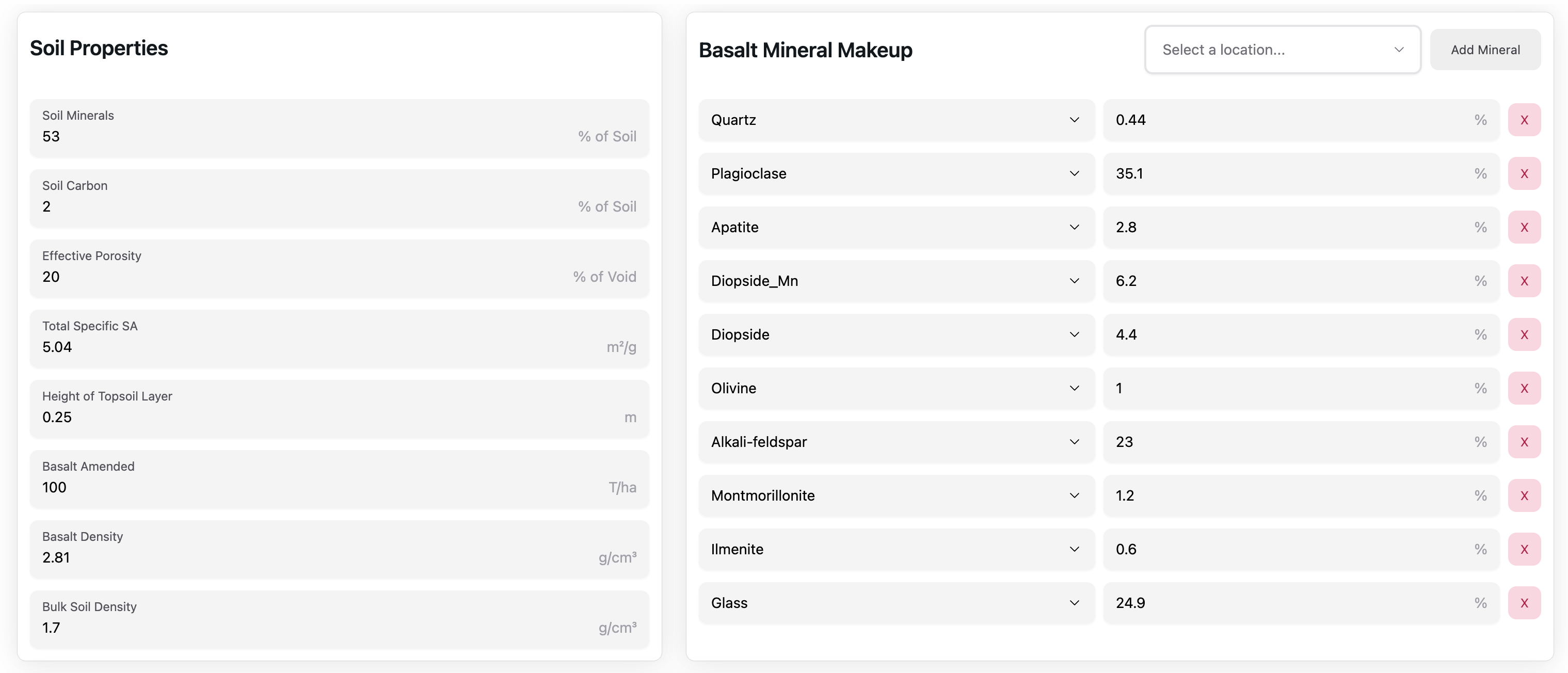
After configuring these values, users can then inspect the pre-calculated values in the next section, look at the calculated output parameters or download the simulation files and change directly modify the model files locally.
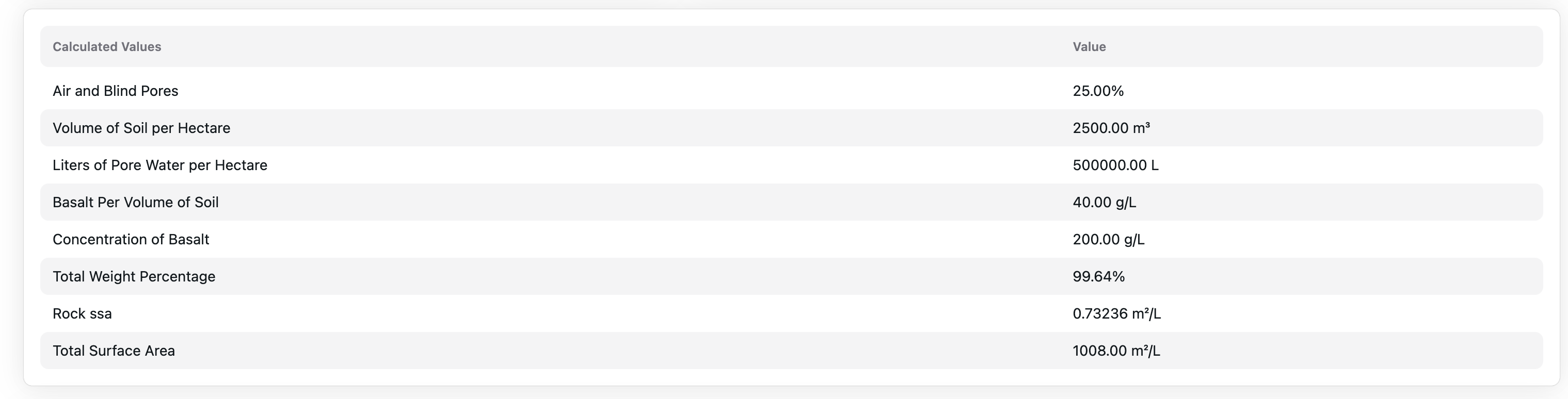
Simulation Execution and Calculated Parameters
Once inputs are set, the tool computes calculated soil properties and geochemical constraints:
- Air and Blind Pores (%)
- Volume of Soil per Hectare (m³/ha)
- Liters of Pore Water per Hectare (L/ha)
- Basalt Per Volume of Soil (g/L)
- Total Weight Percentage (%)
- Total Surface Area (m²/L)
These calculations provide insight into the physical and chemical constraints influencing dissolution kinetics and reaction rates.
Exporting/Importing Pre-Defined Configurations, Viewing Output Parameters, and Downloading/Running Simulations
The final row of buttons provides advanced functionality for managing simulation configurations and output data. Users can export their current configuration for sharing or import predefined configurations from colleagues. This mirrors the functionality of selecting a new location, allowing field measurements to be directly incorporated into a JSON configuration file for seamless integration into the database.
For those requiring deeper customization, the tool enables direct modification of the PHREEQC model. Simulation files can be downloaded, adjusted, and reuploaded using the “Upload Custom Models” link in the footer. This feature provides enhanced control over reaction kinetics, mineral dissolution rates, and geochemical equilibria, allowing for tailored sensitivity analyses and scenario testing.
Executing a simulation sends all configured parameters and computed values to Jetstream2, Indiana University’s supercomputer, where PHREEQC processes the geochemical modeling at scale. The generated simulation results are stored and can be shared via a unique link, remaining accessible for up to one year before automatic file recycling. This enables collaboration across research teams and ensures reproducibility of computational experiments.

Simulation Results Overview
Once the simulation is executed, the results provide a detailed breakdown of geochemical processes occurring in the soil-mineral-water system over time. The output consists of multiple visual representations that allow users to analyze key interactions and trends related to carbon sequestration, water chemistry, soil properties, and mineral dissolution.
Total CO₂ Sequestered
The Total CO₂ Sequestered plot is a fixed-output graph that shows cumulative carbon capture over time. It breaks down contributions from different capture mechanisms:
- Effluent Calcite: Represents CO₂ captured via calcite precipitation in solution.
- Effluent Bicarbonate: Accounts for CO₂ retained in solution as bicarbonate ions.
- Soil Calcite: Tracks CO₂ stored within the soil as solid-phase carbonate minerals.
- Total Capture: The sum of all sequestration pathways, representing the overall efficiency of enhanced weathering.
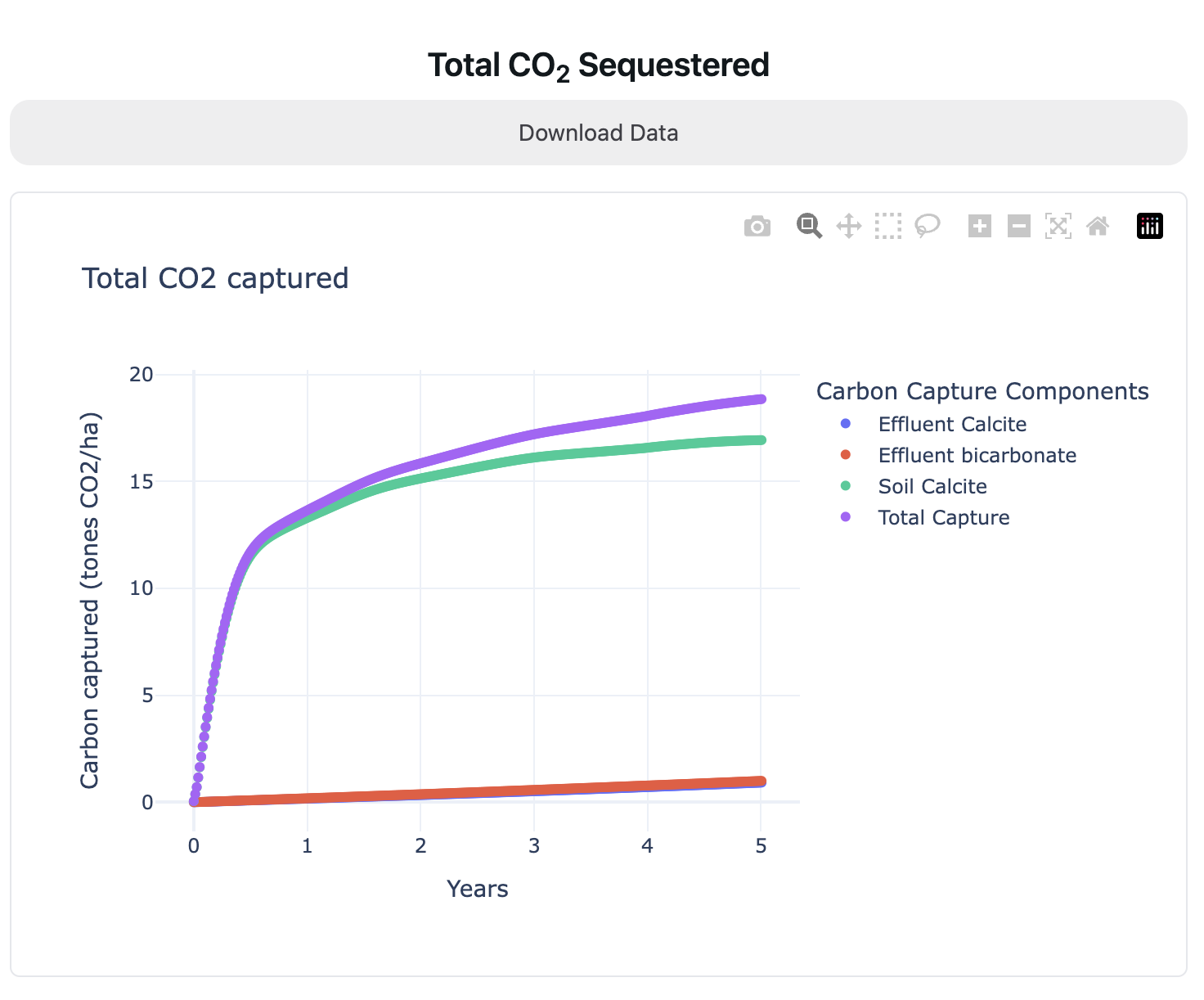
This graph basically provides a big-picture view of carbon sequestration dynamics.
Water Properties
The Water Properties section enables users to inspect the concentration of dissolved elements over time and depth. The primary adjustable parameter is the element of interest (e.g., nitrogen, calcium, bicarbonate), allowing a customized view of evolving water chemistry.
The main water chemistry plot displays:
- Concentration vs. Depth at different time steps.
- Temporal Evolution of the selected element over time for different solution cells.
- Cell Properties, which visualize spatial variation in concentrations across the soil column.
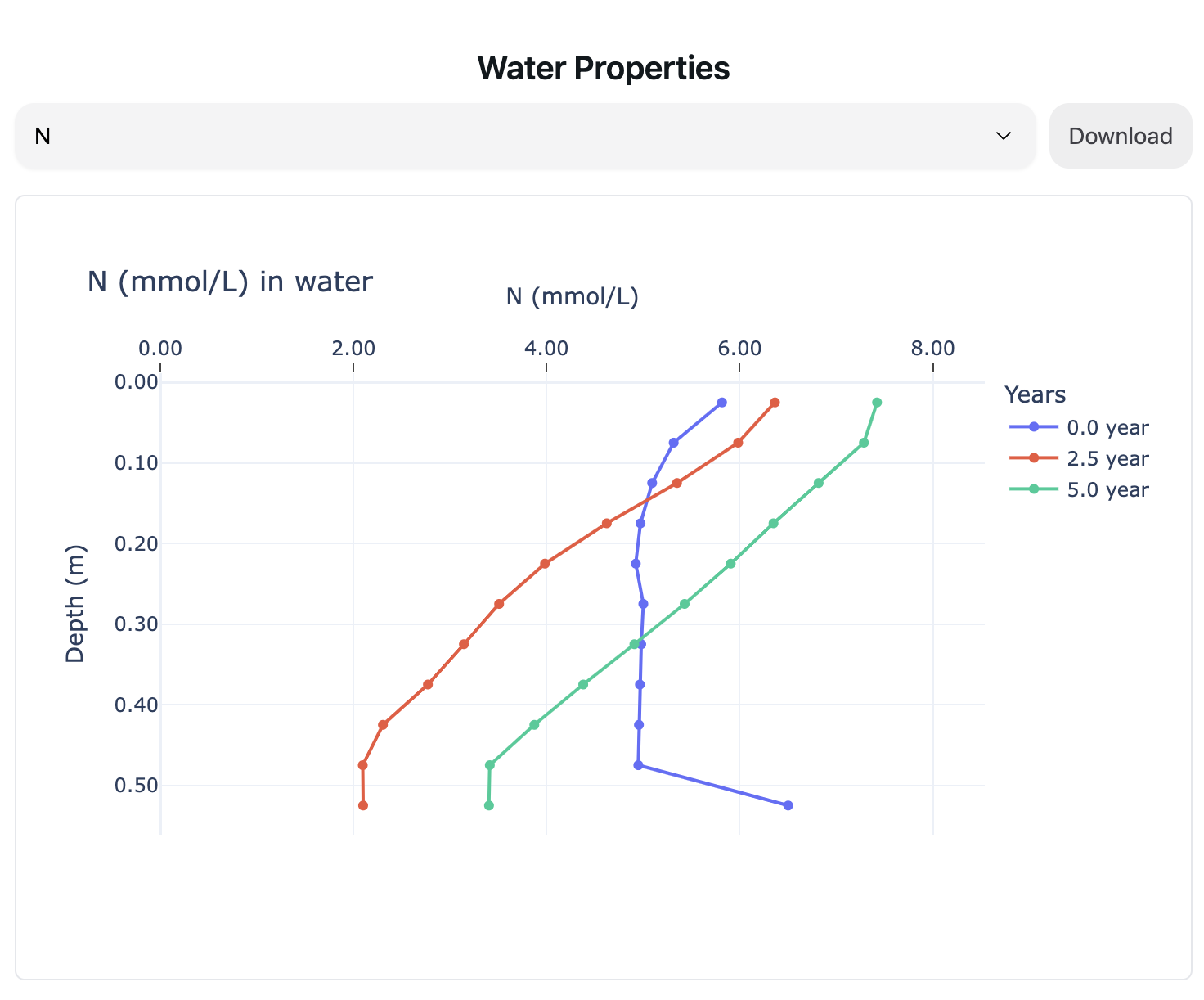
These plots provide insights into ion mobility, leaching potential, and the interaction between mineral dissolution and water chemistry.
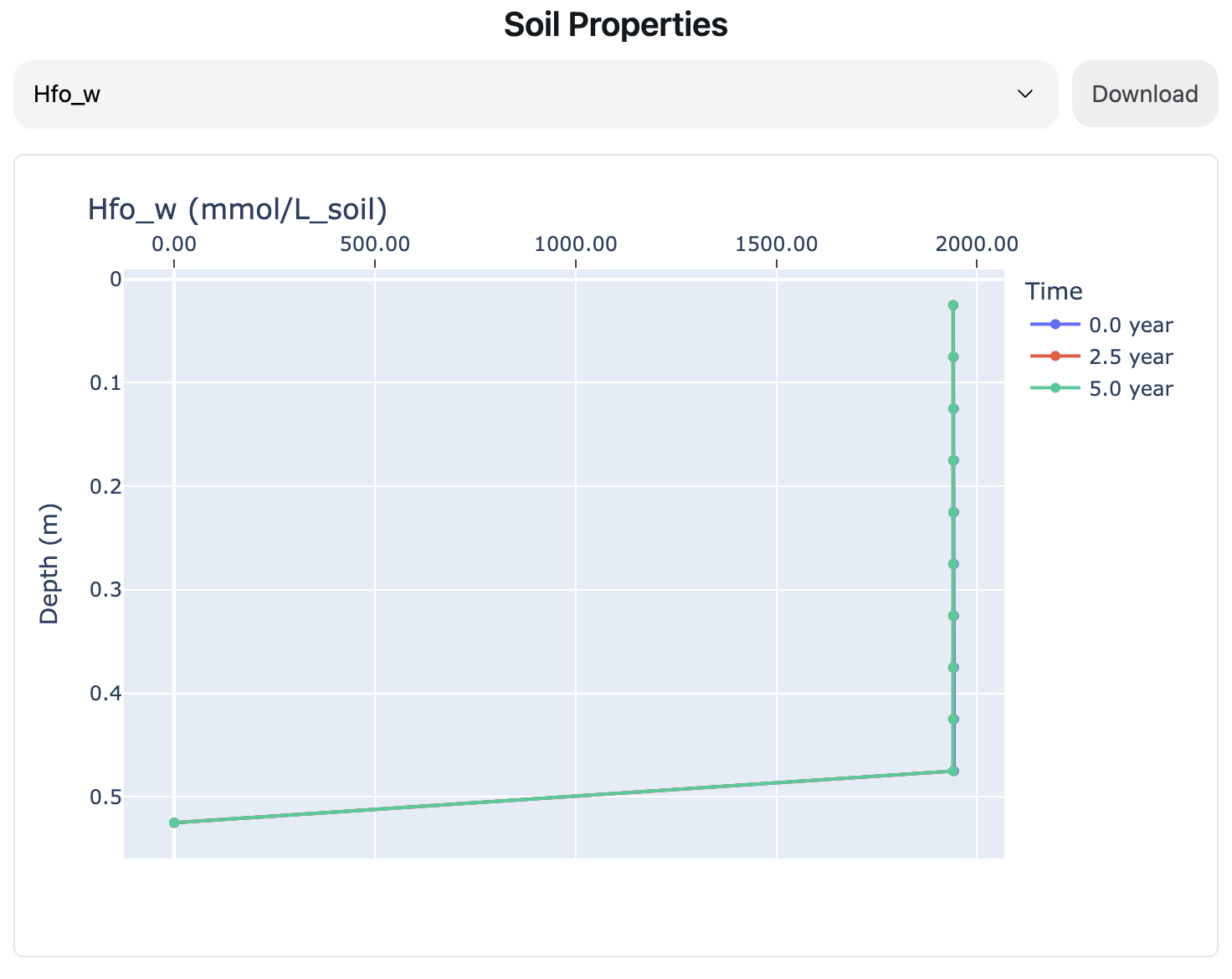
Soil Properties
This section presents spatial and temporal trends in soil-associated variables such as mineral dissolution rates and sorption dynamics. Users can download the dataset for their particular parameter for further analysis.
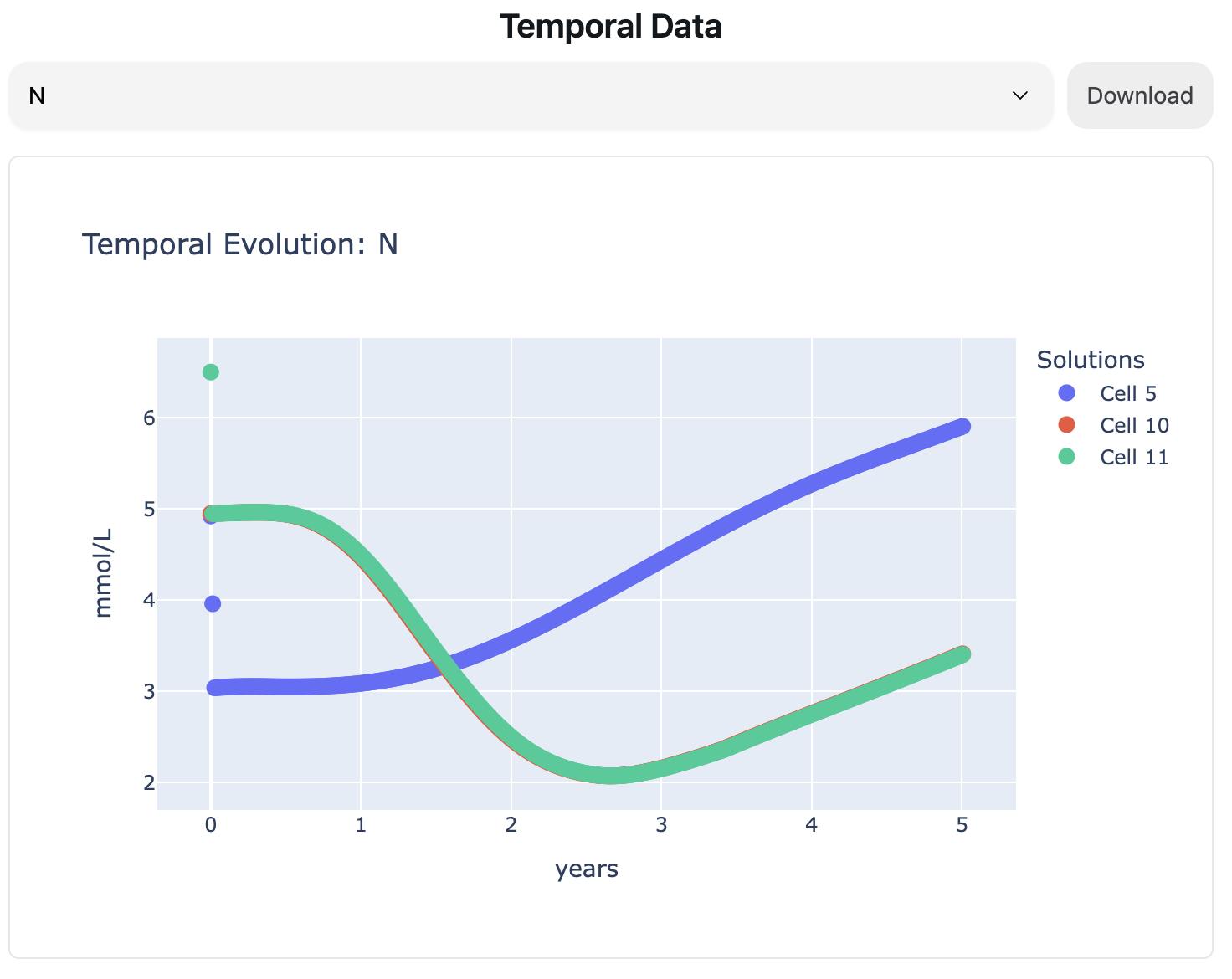
Temporal Data
The Temporal Evolution plots track the selected element over time across different solution cells. These plots help examine:
- The rate of geochemical changes in solution.
- How different soil locations respond to weathering processes.
- The stabilization trends of dissolved species.
The ability to select different elements provides flexibility in tracking specific geochemical reactions.
Cell Properties
The Cell Properties plot offers a heatmap-style visualization of element concentrations over time and depth. It helps identify:
- Zones of active dissolution and precipitation.
- Gradients of element transport within the soil column.
- Long-term behavior of aqueous geochemistry.
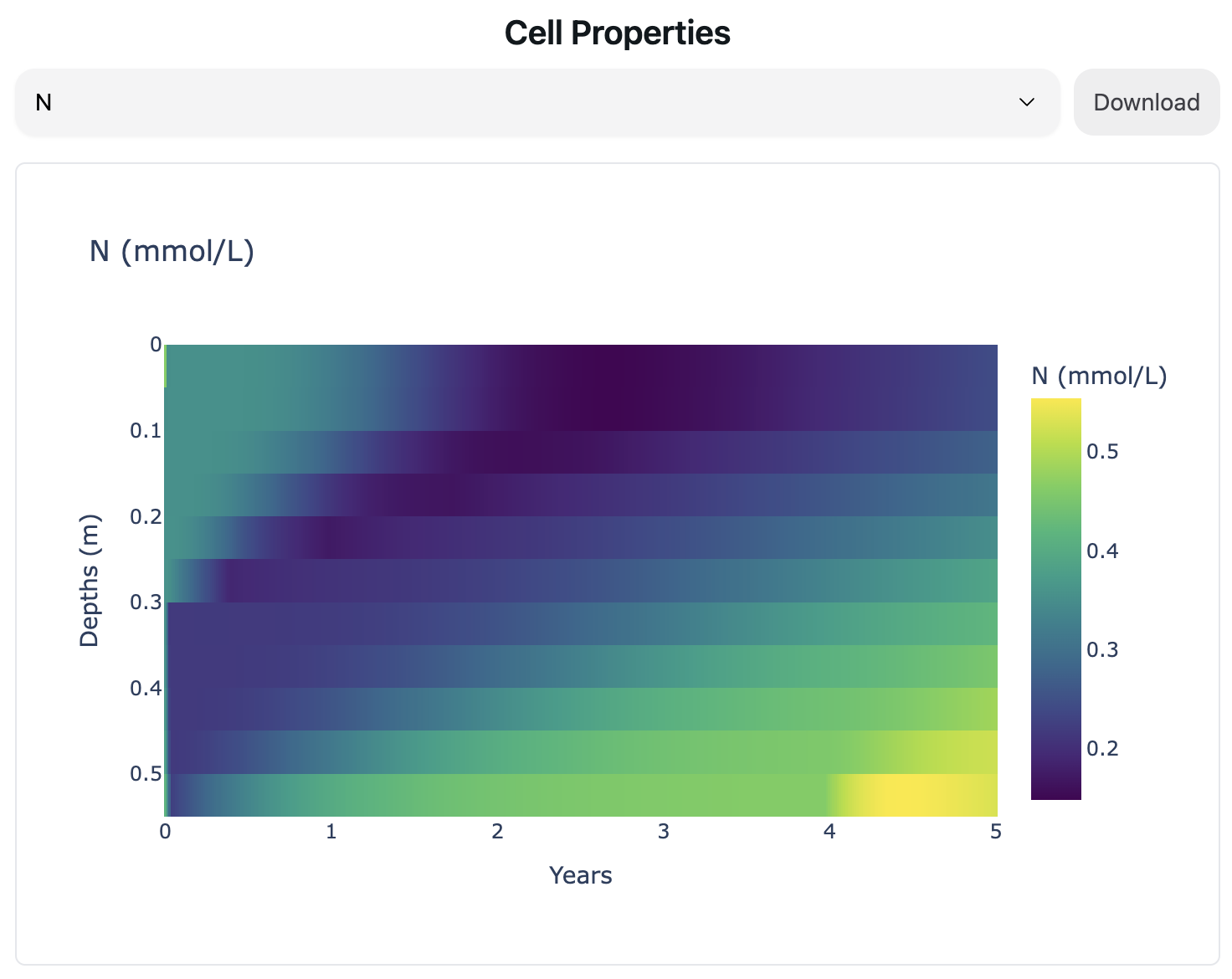
This interactive plot is particularly useful for understanding diffusion, advection, and reaction kinetics over time.
Interpreting the Results
Each of these plots provides critical insights into the effectiveness of enhanced weathering for CO₂ sequestration. By adjusting input parameters, users can explore how different conditions (e.g., soil composition, mineral amendment rates, and hydrological properties) impact the geochemical evolution of the system.
- A higher basalt amendment rate generally leads to faster dissolution and increased cation release.
- Increased soil porosity enhances water infiltration and element transport.
- The dominance of carbonate precipitation vs. bicarbonate transport is influenced by pH and ion activity in solution.
Users can also download the entire dataset for further analysis or return to the calculator to modify input parameters and rerun simulations under different conditions.
Conclusion
This structured workflow ensures that users can define soil and mineralogical conditions, run geochemical simulations, interpret CO₂ sequestration potential, and extract results for further analysis. By leveraging PHREEQC’s advanced geochemical modeling capabilities, the tool facilitates rigorous assessment of enhanced weathering strategies for carbon dioxide removal and nutrient cycling in terrestrial environments.