Data Management
This document provides an overview of the data management capabilities of the geochemical simulation tool. The tool is designed to model geochemical interactions in soil systems, particularly focusing on enhanced weathering and carbon sequestration. Utilizing PHREEQC as its computational backend, the tool simulates the dissolution kinetics of basaltic minerals, cation release, secondary mineral formation, and CO₂ sequestration through carbonate precipitation and bicarbonate transport.
The following sections detail how users can manage data within the tool, including exporting and importing JSON files, viewing output parameters, and downloading simulation files.

Exporting Data as JSON
Users can export simulation data as a JSON file for external analysis, record-keeping, or further computational processing. This feature ensures that all relevant input parameters, output results, and intermediate calculations are stored in a structured format for reproducibility and comparison with other datasets. The exported JSON includes:
- Initial soil and mineral composition
- Calculated values (air and blind pores, volume of soil per hectare, etc)
- Output parameters (each minerals’ individual calculated values)
Importing Data from JSON
This feature allows users to load pre-existing simulation configurations from a JSON file. Importing data enables reproducibility, facilitates collaborative research, and supports iterative model refinement. When importing, users should ensure that:
- The JSON structure matches the required format
- Mineral compositions and hydrological parameters align with the intended scenario
- Previous results are reviewed for consistency before running new simulations
Example JSON configuration:
{
  "soil_properties": {
    "soilMinerals": 53,
    "soilCarbon": 2,
    "effectivePorosity": 20,
    "totalSpecificSA": 5.04,
    "heightOfTopsoilLayer": 0.25,
    "basaltAmended": 100,
    "basaltDensity": 2.81,
    "bulkSoilDensity": 1.7
  },
  "calculated_values": {
    "airAndBlindPores": 25,
    "volumeOfSoilPerHectare": 2500,
    "litersOfPoreWaterPerHectare": 500000,
    "basaltPerVolumeOfSoil": 40,
    "concentrationOfBasalt": 200,
    "totalWeightPercentage": 99.6399,
    "rockssa": 0.7323,
    "totalSurfaceArea": 1008
  },
  "minerals": [
    {
      "name": "Quartz",
      "percentage": 0.44,
      "concentration": 0.0146,
      "surface": 3.8431
    },
    ...
    {
      "name": "Glass",
      "percentage": 24.9,
      "concentration": 0.5036,
      "surface": 809.3378
    }
  ]
}
Showing Output Parameters
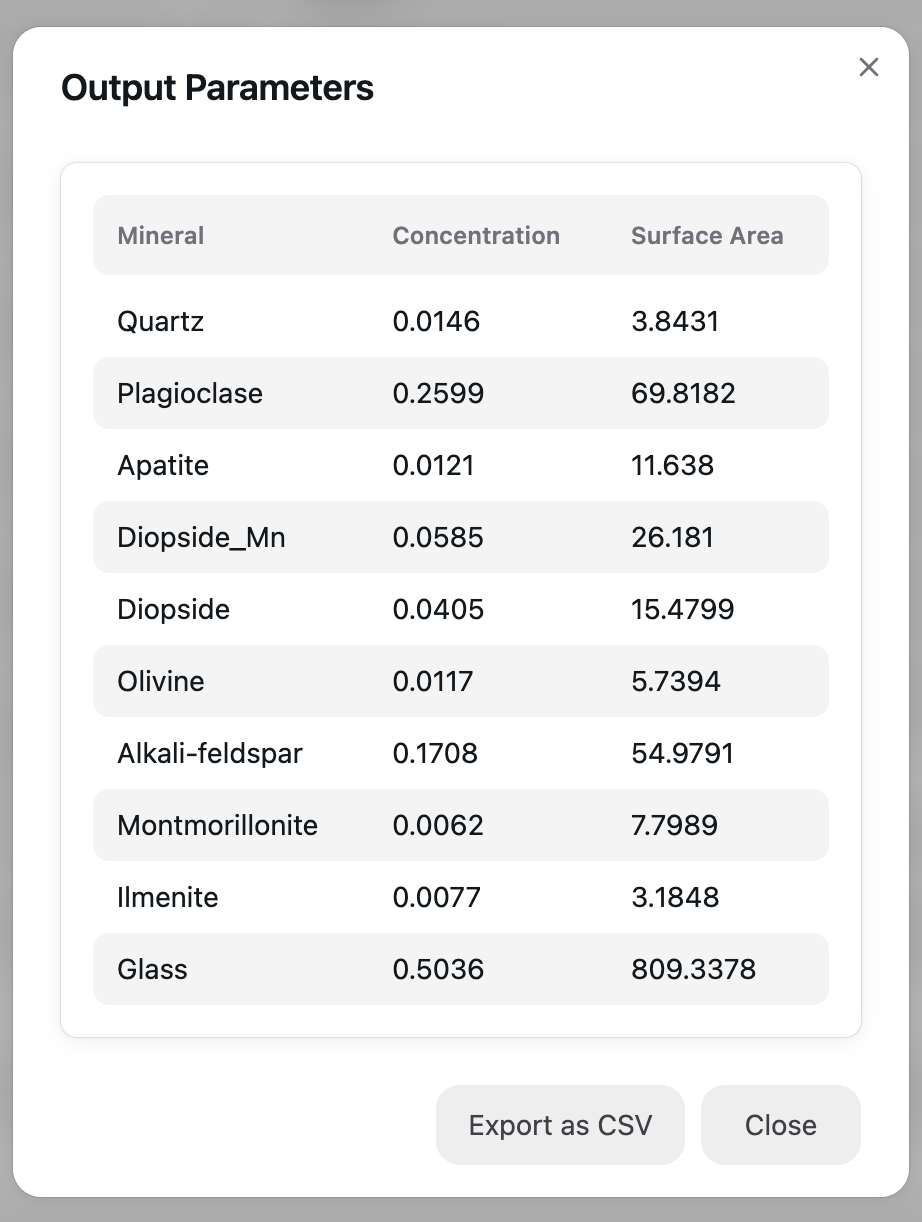
This section displays the Output Parameters generated by the application. The table contains three columns:
- Mineral: Lists different minerals detected in the analysis.
- Concentration: Represents the proportion of each mineral in the sample.
- Surface Area: Displays the surface area corresponding to each mineral.
Features:
- The table is formatted for easy readability, with alternating row highlights.
- The “Export as CSV” button allows users to download the data for further analysis.
Downloading Simulation Files
Users can download complete simulation files for offline analysis, external validation, or archival purposes. These files include:
- PHREEQC input and database files for easy in-depth modification
- JSON configuration for summaries of key parameters
By providing access to these files, the tool ensures that users can conduct thorough post-processing, validate results against experimental data, and integrate findings into broader research frameworks.